¿Por qué mi termómetro de carne inalámbrico se sigue desconectando?


 288 Comments


En medio de una barbacoa en el patio trasero, tu termómetro de carne inalámbrico debería ser lo único de lo que no tengas que preocuparte. Se supone que te da libertad, permitiéndote relajarte, socializar o preparar guarniciones mientras tu comida se cocina a la perfección.
Sin embargo, cuando la conexión se interrumpe constantemente, esa comodidad se convierte rápidamente en frustración. Te pierdes las alertas de temperatura, cocinas demasiado tu bistec o, peor aún, arruinas un costoso brisket.
La verdad es que la mayoría de los problemas de desconexión de los termómetros de carne inalámbricos no son aleatorios. Por lo general, provienen de un puñado de causas predecibles. Una vez que las entiendas, podrás solucionar el problema rápidamente y evitar que vuelva a ocurrir.
7 Razones por las que tu Termómetro de Carne Inalámbrico Pierde la Conexión
Los termómetros de carne inalámbricos dependen de señales, como Bluetooth, Wi-Fi y RF, para comunicarse entre la sonda, el transmisor y tu dispositivo. Estas señales son invisibles, pero son muy sensibles a la distancia, los obstáculos, las interferencias y las condiciones de alimentación.
Así que, cuando tu termómetro de carne inalámbrico se desconecta, suele ser porque algo está debilitando o interrumpiendo esa ruta de la señal. Desglosemos las causas más comunes y cómo solucionarlas eficazmente.
Limitaciones del Alcance Inalámbrico
Uno de los problemas más incomprendidos es el alcance inalámbrico. Muchos usuarios asumen que su termómetro de carne inalámbrico funcionará en cualquier lugar de la casa o incluso fuera de ella, pero rara vez es así.
Si tu termómetro de carne se conecta directamente a tu teléfono a través de Bluetooth, estás sujeto a estrictas limitaciones de distancia, por ejemplo, el TempSpike Plus TP970 te permite monitorear tu cocción desde una distancia de hasta 600 pies. La conectividad Bluetooth se desconectará cuando estés fuera del alcance. El alcance es para una línea de visión clara en un campo abierto. Si introduces una pared exterior de ladrillo, ventanas de doble panel y un refrigerador entre tú y la parrilla, el alcance real suele ser mucho más corto. Cuando te alejas demasiado, la señal se debilita gradualmente hasta que se pierde por completo.

Por qué sucede esto:
- La intensidad de la señal disminuye rápidamente con la distancia.
- Las paredes, muebles y electrodomésticos absorben o dispersan las señales.
- Los entornos exteriores introducen interferencias adicionales.
Qué puedes hacer:
- Mantente dentro de un rango de trabajo realista.
- Mantén tu teléfono o receptor en el mismo lado de la casa o el patio.
- Prueba tu alcance antes de comenzar una cocción larga.
- Si te mueves con frecuencia, considera actualizar a un termómetro de carne RF o Wi-Fi.
Interferencia de la señal: El atasco invisible
Las barbacoas de verano suelen significar más gente y más dispositivos. Cada smartphone, tablet, altavoz inteligente y router Wi-Fi compite por el espacio de la señal.
La conexión de tu termómetro de carne inalámbrico puede "saturarse", especialmente en vecindarios con un uso denso de Wi-Fi. Lo que realmente sucede: Bluetooth y Wi-Fi operan en bandas de frecuencia compartidas. Demasiados dispositivos crean señales superpuestas. Esto causa retrasos, inestabilidad o desconexiones repentinas. Cómo solucionarlo:
- Aleja tu termómetro de carne inalámbrico de routers o hubs inteligentes.
- Evita colocarlo cerca de microondas o aparatos electrónicos grandes.
- Cambia tu router a un canal menos congestionado (si usas Wi-Fi).
- Apaga los dispositivos Bluetooth no utilizados cercanos.
Si tu conexión se interrumpe solo durante las reuniones, pero funciona bien en otras ocasiones, la interferencia es casi con seguridad la culpable.
Batería Baja: La Causa Olvidada
Una batería débil no solo reduce el tiempo de uso. También afecta directamente la intensidad y estabilidad de la señal. Muchos usuarios no se dan cuenta de que su termómetro de cocina inalámbrico se desconecta simplemente porque se está quedando sin energía.
Por qué la batería baja causa desconexiones:
- Reducción de la potencia de transmisión
- Salida de señal inconsistente
- Mayor probabilidad de apagados aleatorios
Señales de que este podría ser tu problema:
- Desconexiones frecuentes durante cocciones más largas
- El dispositivo se reconecta brevemente y luego se vuelve a caer
- El indicador de batería muestra niveles bajos o fluctuantes
Soluciones sencillas:
- Carga completamente las sondas y los transmisores antes de cocinar
- Reemplaza las baterías desechables regularmente
- Evita iniciar cocciones largas, como costillas o brisket por debajo del 50% de batería
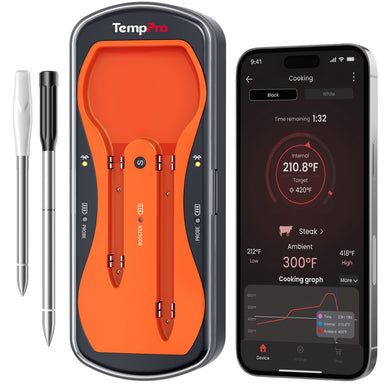
Piensa en la duración de la batería como tu base. Si es inestable, todo lo demás también lo será. El Termómetro de Carne Wi-Fi TempSpike Pro cuenta con hasta cuatro sondas totalmente inalámbricas, cada una con hasta 36 horas de tiempo de cocción continua. Su potente amplificador proporciona hasta 20 horas de duración de la batería, lo que lo hace ideal para sesiones de ahumado largas, cocciones nocturnas y barbacoas durante todo el día sin interrupción.

Obstrucciones físicas: Cuando tu parrilla/ahumador se convierte en un bloqueador de señales
Aquí hay algo que muchos usuarios pasan por alto: tu propia parrilla o ahumador puede ser el problema.
El metal es uno de los mayores enemigos de las señales inalámbricas. Cuando colocas una sonda dentro de una parrilla cerrada, esencialmente la estás colocando dentro de una caja de metal, como una mini jaula de señal.
Qué está pasando:
- El metal refleja y absorbe las señales de radio
- Las tapas cerradas atrapan las señales en el interior
- Los ahumadores gruesos amplifican el problema
Cómo mejorar la conectividad:
- Coloca el transmisor fuera de la parrilla siempre que sea posible
- Mantén el receptor o el teléfono en línea de visión directa
- Ajusta ligeramente la posición para encontrar una ruta de señal más fuerte
Incluso pequeños cambios, como mover el receptor unos pocos pies, pueden marcar una diferencia notable.
Problemas de la aplicación y el firmware
No todas las desconexiones son físicas, a veces el problema es digital. Los termómetros de carne inalámbricos Bluetooth dependen de aplicaciones y firmware interno para funcionar correctamente. Si alguno está desactualizado o tiene errores, tu conexión puede caerse inesperadamente.
Problemas comunes relacionados con el software:
- Cierres o bloqueos de la aplicación.
- Problemas de compatibilidad del firmware.
- Reconexiones retrasadas o fallidas.
Cómo solucionarlo:
- Actualiza tu aplicación del termómetro regularmente.
- Busca actualizaciones de firmware en la configuración de la aplicación.
- Reinicia tu teléfono y vuelve a abrir la aplicación.
- Reinstala la aplicación si los problemas persisten.
Si tu dispositivo se desconecta incluso cuando estás justo al lado, la aplicación es un probable sospechoso.
Configuración del Smartphone: Restricciones ocultas que desconocías
Los smartphones modernos están diseñados para ahorrar batería y, a veces, eso va en tu contra. Funciones como el modo de ahorro de batería o las restricciones de aplicaciones en segundo plano pueden cortar silenciosamente la conexión de tu termómetro.
Lo que podría estar sucediendo:
- Bluetooth se pausa cuando la pantalla está apagada
- Las aplicaciones en segundo plano están limitadas o se cierran
- Los permisos impiden que la aplicación mantenga una conexión
Lo que debes verificar:
- Desactiva la optimización de batería para tu aplicación del termómetro de carne
- Permite la actividad en segundo plano y las notificaciones
- Mantén Bluetooth y Wi-Fi completamente habilitados
- Evita cerrar la aplicación mientras cocinas
Estos ajustes son fáciles de pasar por alto, pero pueden interrumpir por completo tu experiencia.
Error de emparejamiento y configuración
A veces, el problema comienza justo al principio. Si tu termómetro de carne inalámbrico no se emparejó correctamente o si varios dispositivos intentan conectarse, es posible que experimentes un rendimiento inestable desde el principio.
Por qué la configuración es importante:
- Los dispositivos Bluetooth a menudo admiten conexiones limitadas.
- Un emparejamiento incorrecto puede causar conflictos de señal.
- Los datos de conexión antiguos pueden interferir con las nuevas sesiones.
Cómo solucionarlo correctamente:
- Restablece el termómetro de alimentos a la configuración de fábrica.
- Elimina los emparejamientos antiguos de tu teléfono.
- Vuelve a conectar paso a paso siguiendo las instrucciones.
- Evita conectar varios teléfonos simultáneamente.
Una configuración limpia a menudo resuelve problemas de desconexión persistentes y difíciles de explicar.
Cuándo Contactar con el Servicio de Atención al Cliente
Si has probado todo lo de esta lista y tu termómetro sigue desconectándose, podría ser el momento de contactar con el fabricante.
Contacta al soporte si:
-
La sonda muestra daños físicos (piezas sueltas, grietas visibles).
-
El cargador no se enciende incluso con baterías nuevas.
-
Has limpiado, cargado y actualizado todo, pero el problema persiste.
-
El dispositivo todavía está en garantía.
Consideraciones Finales
Las desconexiones del termómetro de carne inalámbrico pueden parecer impredecibles, pero rara vez son aleatorias. En la mayoría de los casos, el problema se reduce al alcance, la interferencia, la energía o la configuración. Una vez que identifiques cuál se aplica a tu situación, la solución suele ser sencilla.
Antes de tu próxima cocción, tómate unos minutos para:
- Revisar tu batería
- Probar el rango de tu conexión
- Optimizar la ubicación
- Actualizar tu aplicación
Estos pequeños pasos pueden marcar la diferencia entre una cocción frustrante y una sin problemas.
Un termómetro de carne inalámbrico fiable te ayuda a cocinar de forma más inteligente y sencilla. Cuando tu conexión es estable, puedes alejarte de la parrilla, confiar en tus lecturas y concentrarte en disfrutar del momento, ya sea recibiendo amigos, pasando tiempo con la familia o simplemente relajándote en una noche de verano.
Soluciona las desconexiones y liberarás todo el potencial de tu configuración de cocina.


Comentarios
También te puede interesar


Productos recomendados